Keycard is a versatile smart card that works in multiple configurations. While you can use Keycard with Shell, you can also connect Keycard directly to a compatible software wallet — either on mobile or desktop.
When using a mobile software wallet, interaction is simple and wireless: just tap your Keycard against your phone's NFC area to authenticate or sign transactions. No additional hardware is required.
When using a desktop software wallet, you'll need a USB smart card reader to connect your Keycard to your computer.
Any smart card reader compliant with ISO 7816 will work with Keycard. This includes both contact readers (where the card is physically inserted) and NFC/contactless readers.
We sell a compact card reader that works great with Keycard: Buy it here
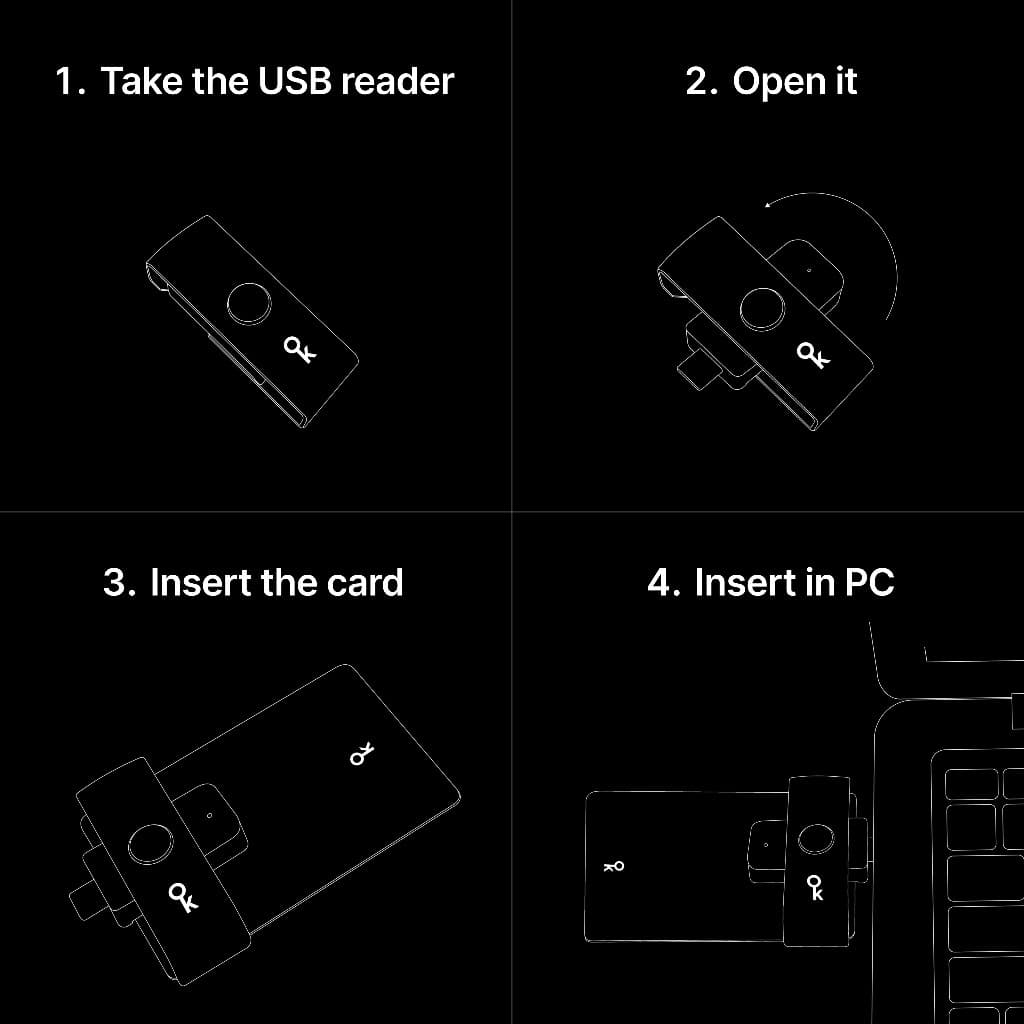
Our reader has a simple rotating mechanism. Here's how to use it:
- 1Start with the reader closed.
- 2Rotate the inner part to open the card slot.
- 3Insert your Keycard with the logo facing up.
- 4Plug the reader into your computer's USB port.
If your card reader is not automatically detected on Linux, you may need to ensure that the pcsc service is installed and pcscd is running.
Linux commands to install and run pcsc might depend on your Linux distro. The one below apply to Debian/Ubuntu-based distributions.