Keycard Shell verification: How you can prove your Shell is authentic

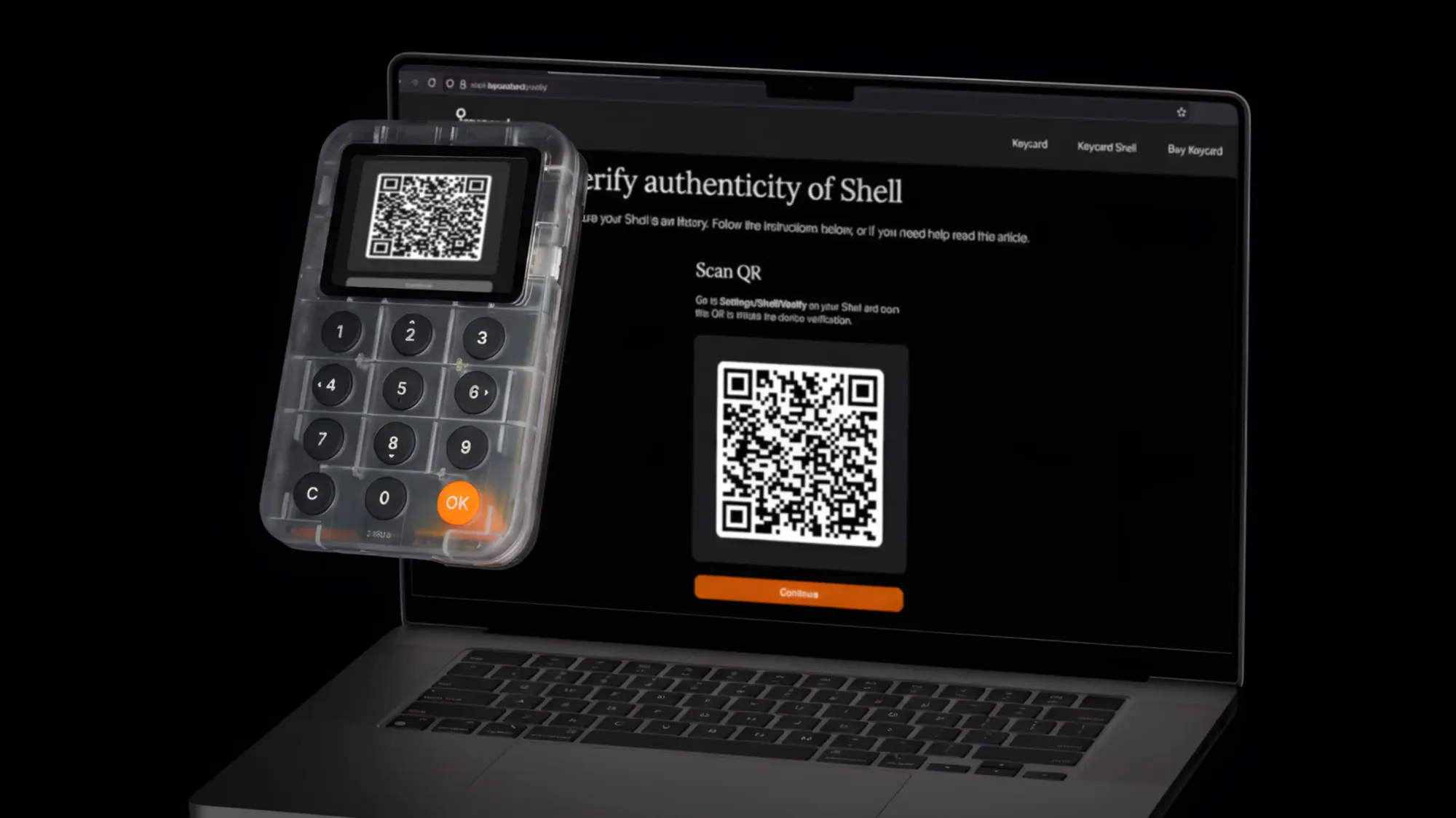
If you’ve ever opened a new hardware wallet and had that tiny moment of doubt - “Okay, but how do I know this thing wasn’t swapped, opened, or messed with?” - you’re not being dramatic. You’re thinking like someone who plans to keep crypto for years.
That’s the supply-chain problem in one sentence: you don’t just need secure hardware - you need a way to confirm you received the right hardware.
Keycard Shell’s verification page is built for that exact moment: before you move funds, before you build habits around a device you haven’t verified yet. The page is explicitly positioned as a way to “verify authenticity” and “check verification history.”
Here, we help you with what I actually have to trust, and how easy is it to run the check correctly?
This is the part most people know in the abstract, but still underestimate in practice.
Packaging can help you spot obvious interference. But it’s not a cryptographic truth. Bluntly put: anti‑tampering seals can create a false sense of security and can be cloned.
So: you want a check that an attacker can’t “reprint.” That means a challenge-response protocol where a counterfeit device can’t produce the right signatures.
That’s what our Shell /verify is doing.
The flow is intentionally simple:
- 1On your Shell: go to Settings -> Shell -> Verify and scan the QR on the web page.
- 2On the web page: hit Continue, enable your camera, and scan the QR shown on your Shell.
- 3If everything checks out, the page tells you your device is genuine and (importantly) can warn you if it has been verified before.
So far, so normal.
Now let’s talk about what’s actually happening under the hood - because this is where the supply-chain risk reduction becomes real.
Looking at the web app code, we can find the verification flow being a four‑step handshake. Think “challenge–response”, not “scan a QR and trust a website.”
When you load shell.keycard.tech/verify/, your browser creates a fresh random 32‑byte challenge and turns it into a QR code.
A key detail: this QR isn’t a link. It’s a structured payload (UR/CBOR) that says, essentially:“Start device authentication, here’s the challenge.”
Your Shell scans that QR while in Verify mode. Then the Shell shows a QR back to you that contains:
- the device ID (UID)
- a device-generated challenge (separate from the browser’s)
- a signature over the browser’s original challenge
That signature is the hard-to-fake part. A counterfeit device shouldn’t be able to produce it.
When you scan the Shell’s QR with your phone/laptop camera, the web app sends the data to the server.
On the backend, the server:
- looks up the device UID in its database
- pulls the device’s registered public key
- verifies the signature (ECDSA over secp256k1, hashed with SHA‑256)
If verification passes, the server updates and shows verification history:
- first verification time (when this device was first verified)
- last verification time (now)
- a counter (how many times it’s been verified)
The UI may warn you if the Shell has been verified before: the web app literally tracks a verification counter and shows a warning when it’s not the first time.
The server also signs its own response payload with a server signing key and returns it to the browser as a CBOR payload which the page can display as another QR.
Scan that QR with your Shell! Your Shell verifies the server’s signature and checks the receipt matches the challenge it created.
If a malicious browser/extension/phishing page simply “draws” a fake success screen, it cannot produce a receipt your Shell will accept - because it can’t forge the server signature or satisfy the session binding.
To fake “genuine” in this flow, an attacker would need to either:
- produce a valid device signature without the real device key, or
- trick the server into accepting a fake public key for a real UID.
That’s a much tougher problem than “copy a sticker” or “print a convincing box.” And because Keycard Shell’s firmware is signed and verified by the bootloader (secp256k1 signature with an embedded public key), it’s impossible to run arbitrary modified firmware on official devices.
This is the right question - and it’s where a lot of “verification pages” on the internet get hand-wavy.
Here’s the honest answer:
The first QR is just a random challenge. A phishing site can show you a random challenge too.
But also: that’s fine, because scanning that QR (in Verify mode) is not giving the site access to your keys or signing a transaction. You’re not approving a send. You’re doing a device-auth handshake.
Two practical points:
- The server only says “genuine” if the device proves it can sign correctly.
- After a successful verification, the page can display a server-signed payload (as a QR) that your Shell can scan.
That last part matters because it shifts trust away from your browser’s “Success!” message. If a site were trying to fake the result locally, it would need to forge the server signature - which it can’t do without the signing key.
Even with strong cryptography, don’t train yourself to trust random links.
If you want the simple checklist:
- Make sure it’s HTTPS in your browser.
- If something feels off (weird redirects, weird “download this app” prompts), bail.
And if your Shell indicates a failure or the page warns the device was already verified and you don’t know why, stop and contact the team.
The verification page is the first supply-chain defense. But the reason people stick with Shell is the architecture.
Keycard Shell is explicitly built around a removable smartcard (Keycard):
- the Keycard holds the keys
- the Shell talks to it over a smartcard interface
- the Shell itself doesn’t store private keys
And because it supports multiple removable Keycards, you can do “real backups” in a way that feels more like swapping hardware modules than doing one fragile, single-device ritual.
It protects you from a major category: counterfeit or swapped devices that can’t produce the right cryptographic proofs. That’s the point of attestation-style checks (and why multiple vendors emphasize cryptography over packaging).
A fake site can show you a QR, but it can’t forge the cryptographic signatures involved in a successful verification result. Still: use the official domain and good browser hygiene.
If supply-chain risk is on your mind, you’re already past the “cool gadget” phase. You want a wallet that can prove what it is, not just claim it.
Keycard Shell’s /verify is built for that moment - and the smartcard-based, modular design is what you keep benefiting from after the moment passes.
If you want to pick one wallet setup where verification is simple, the trust model is clean, and your keys live on a removable smartcard: buy Shell from our official store.